

Browsing on an iPhone is usually smooth enough for everyday use, but there is one Safari behaviour that can become annoying very quickly. You are reading an article, checking product reviews, planning a trip, or going through several search results, and every time you open a link, Safari immediately pulls you away from the page you were on.
At first, it feels like a small thing. But after a while, the pattern becomes tiring. You open one link, go back, open another link, go back again, and repeat the same process. When you are trying to compare information or follow several references, Safari can start to feel less like a browser and more like a constant interruption machine.
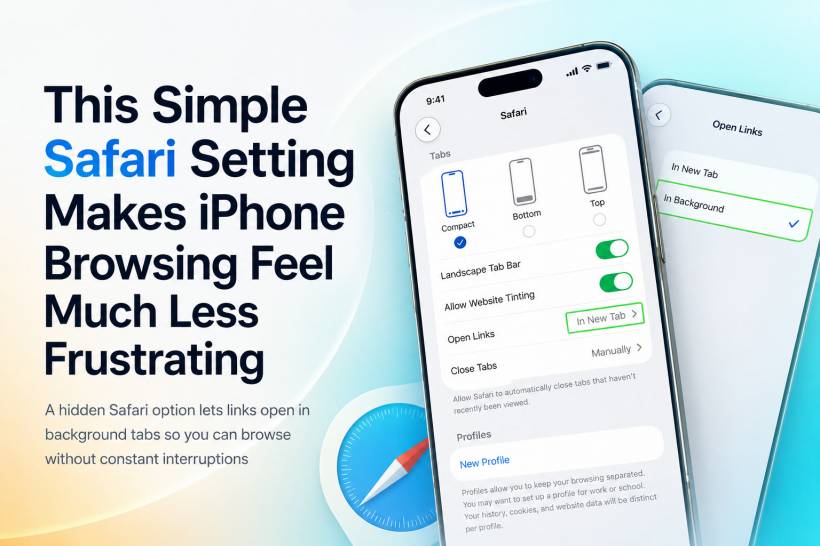
The good news is that Apple already has a fix for this. It is not a new app, not a hidden trick, and not a complicated workaround. It is simply a setting inside Safari that lets links open quietly in the background instead of taking over your screen immediately.
Why Safari's Default Link Behaviour Can Feel Disruptive
On a desktop browser, many of us are used to opening several links in new tabs while staying on the original page. It feels natural. You can continue reading, open anything that looks useful, and return to those tabs later when you are ready.
On iPhone, however, browsing often feels more cramped because everything happens on a smaller screen. When a link opens and instantly moves you to another page, it breaks your reading flow. This is especially noticeable when you are doing anything that requires comparison or research.
For example, you may be checking different products before buying something, opening hotel pages while planning a holiday, or reading an article that links to multiple sources. If every link pulls you away from where you started, you spend more time navigating than actually reading.
That is where Safari's background tab option becomes genuinely useful.
What Opening Links In The Background Actually Does
When you enable background tabs, Safari changes how new links behave. Instead of jumping straight into the new tab, Safari lets the link load quietly in the background while you stay on the current page.
This means you can continue reading without losing your place. You can open one link, two links, or several links, and they will wait for you in Safari's tab view. When you are ready, you can switch over and review them at your own pace.
It is a small change, but it makes mobile browsing feel much more organised. Instead of constantly bouncing between pages, you can collect useful links first and deal with them later.
How To Turn On Background Tabs In Safari
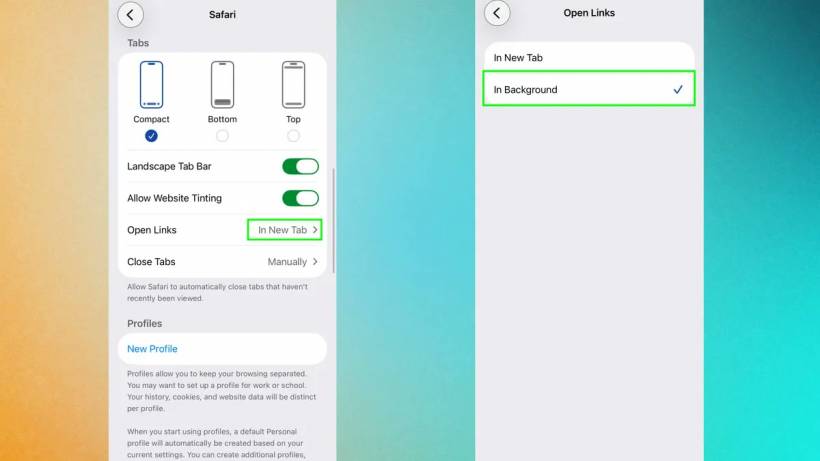
To enable this setting, open the Settings app on your iPhone. Scroll down and tap Safari. From there, look for the Tabs section and tap Open Links.
Inside that menu, you should see options for how Safari handles new links. Change the setting from In New Tab to In Background.
Once this is turned on, Safari will no longer immediately move you away from your current page when you open a link in a new tab. The link will load behind the scenes instead, ready for you when you want to view it.
How To Use It While Browsing
After enabling the setting, open Safari and browse as usual. When you find a link you want to save for later, long-press the link and choose Open in New Tab.
Instead of taking you directly to the new page, Safari will keep you where you are. The new tab will open in the background, allowing you to continue reading, scrolling, or opening more links.
When you are ready to view everything you opened, tap the overlapping squares icon in Safari. This opens the tab overview, where your background tabs will be waiting.
From there, you can read through them one by one, close the ones you do not need, or keep important pages open for later.
Why This Is So Useful For Research And Shopping
The most obvious benefit is product comparison. If you are shopping online, you can open several product pages from search results or a buying guide without constantly leaving the original list. Once you have gathered enough options, you can move through the tabs and compare prices, specifications, reviews, and availability.
It is also useful for travel planning. You can open pages for hotels, attractions, maps, restaurants, and transport details without losing the main page you were using as your starting point.
For reading, it is just as helpful. If an article includes references, related stories, or useful links, you can open them in the background and finish the article first. This makes the reading experience smoother because you are not constantly being pulled away from the main content.
A Small Setting That Makes Safari Feel More Desktop-Like
One of the reasons this setting works so well is that it makes Safari on iPhone behave more like a proper desktop browser. You are no longer forced to treat every link as an immediate destination. Instead, links become something you can queue up and review later.
That may sound minor, but it changes the overall feel of browsing. It gives you more control. Safari becomes less pushy, and your browsing session feels calmer and more intentional.
It also reduces the amount of unnecessary backtracking. You do not need to keep tapping back just to return to the original page. You stay where you are, open what you need, and move on when you decide.
Final Thoughts
Safari's background tab setting is one of those small iPhone features that is easy to miss but genuinely useful once you start using it. It does not completely redesign Safari, but it fixes a browsing habit that can become frustrating during research, shopping, reading, or travel planning.
By allowing links to open quietly in the background, Safari gives you a more relaxed and organised way to browse. You can stay focused on the current page, collect useful links as you go, and review everything later when it suits you.
For anyone who regularly opens multiple links from the same page, this simple toggle is worth turning on. It makes iPhone browsing feel smoother, less disruptive, and much closer to the way many people already prefer to browse on a computer.











Comments 0