

If you've been holding onto Windows 10 and haven't made the jump to Windows 11 yet, you might want to start paying attention to what's happening in Microsoft's ecosystem. Extended Security Updates (ESU) will only buy you three more years of support — and Microsoft has already confirmed that the cost will rise every year. Businesses will feel it first, but there's a good chance home users won't be spared either.
For many people still on older hardware, upgrading to Windows 11 isn't as straightforward as clicking "Update." Microsoft's strict system requirements continue to block perfectly functional PCs. That's where tools like Rufus and Flyoobe come in — and the latter has just released its brand-new version 2.0 preview.
Why Tools Like Flyoobe Still Matter
Rufus is great when you're installing Windows 11 across multiple machines — it lets you generate custom installation media that skips all the TPM and CPU checks. Flyoobe, however, is built for users who want the smoothest experience on a single PC, guiding you through the Out-of-Box Experience (OOBE) with fewer headaches.
And now, Flyoobe is stepping into a new era with its v2.0 preview build, available right now on GitHub.
The Flyoobe 2.0 Preview: What's New?
The developer behind Flyoobe is celebrating the early release of version 2.0 and has made one thing very clear: this is not the final version. It's a test build — expect incomplete features and occasional bugs. But if you're curious or enjoy testing new tools, you can try it immediately.
This update isn't about stuffing in new features. Instead, the developer took a step back and focused on something many power-users overlook: usability. Over the past year, Flyoobe gained a lot of features, a lot of menus… and, naturally, a bit of clutter. Version 2.0 cleans all of that up.
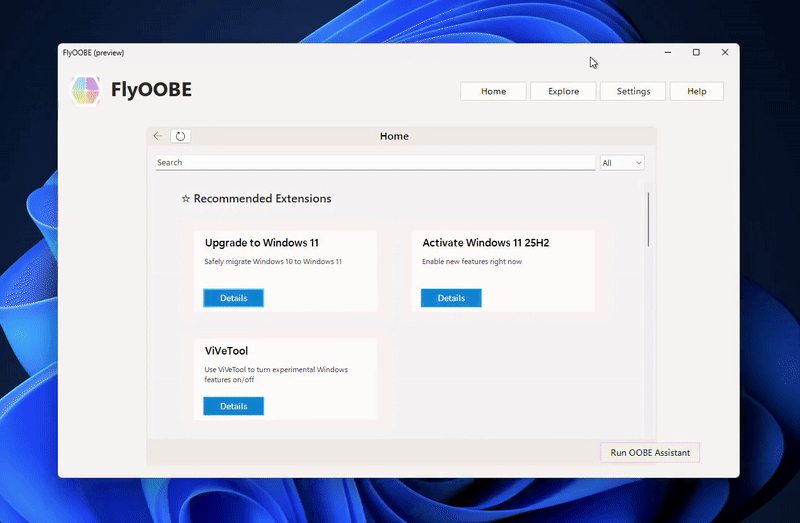
Key Improvements in Flyoobe v2.0
This is important because the OOBE process is meant to be something anyone can complete — even without technical skills. A tool designed to bypass Windows 11 requirements shouldn't feel intimidating.
Should You Try It?
If you love experimenting with new software and don't mind a few rough edges, the preview version is ready for download on GitHub. Just remember: this is not the finished product. You will encounter bugs. You might hit incomplete screens. If you prefer stability over surprise, stick with the current stable release for now.
But for those eager to see how Flyoobe is evolving — and want an easier way to bring Windows 11 onto unsupported hardware — version 2.0 is definitely worth a look.











Comments