


Switching between AI chatbots has never really been a common thing—at least not in the same way we switch phones or laptops. But that might be starting to change. With more people experimenting across platforms, Google is now making it easier to move over to its AI assistant, Google Gemini, without starting from scratch.
The company has introduced two new features: Import Chat History and Import Memory—both designed to help users bring their past interactions and preferences along with them.
Bringing Your Chat History With You
The more straightforward of the two features is Chat History Import.
If you've been using another AI chatbot, you can request an export of your conversations. Most platforms will send this as a ZIP file via email. Once you have it, you simply upload the file into Gemini through the Chat History Import section in the settings.
From there, your previous conversations become accessible inside Gemini, allowing you to pick up where you left off instead of rebuilding everything from zero.
There is, however, a practical limitation—Google currently caps the upload size at 5GB. For most users, that's more than enough, but heavy users might need to trim their data before importing.
The More Interesting One: Importing "Memory"
This is where things get a bit more creative.
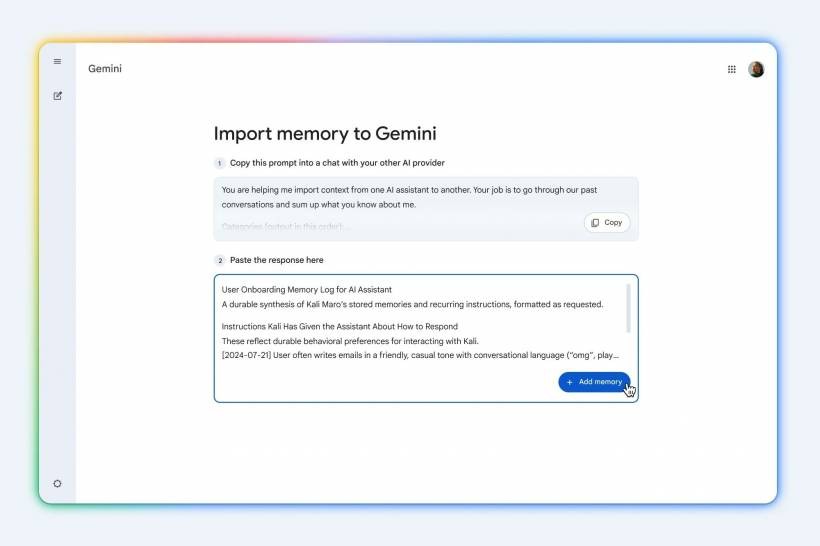
Instead of transferring raw data, the Import Memory feature works through a prompt-based approach. Google provides a pre-written prompt that you copy and paste into your current chatbot. That chatbot then generates a structured summary of your preferences, habits, and context.
You take that response and paste it into Gemini.
In other words, instead of moving conversations, you're moving context—a distilled version of how the AI understands you.
It's a slightly manual process, and the prompt itself can be quite long, but the idea is clever. It allows Gemini to quickly learn about you without needing full access to your entire chat history.

What Doesn't Transfer (And Other Limitations)
There are a few important things to keep in mind.
• Personalisation must be enabled in Gemini to use these features
• The tools are only available for users aged 18 and above
Other than that, the process is free to use, which lowers the barrier for anyone curious about trying a different AI platform.
Why This Matters More Than It Seems
On the surface, this might look like just another feature update. But it actually hints at a bigger shift. AI tools are becoming more personal over time. The more you use them, the more they adapt to your preferences, tone, and workflow. That also means switching platforms becomes harder—because you're not just leaving a tool, you're leaving behind a "trained" assistant. By introducing import features, Google is addressing that friction directly. It's essentially saying: you don't have to start over.
Final Thoughts
The introduction of Chat History and Memory import features in Google Gemini is a small but meaningful step toward a more flexible AI ecosystem.
It acknowledges that users may want to explore different platforms without losing their digital context. And while the process isn't fully automated yet, it's a clear move in the right direction.
If this trend continues, we might eventually see AI tools become as portable as apps on a new phone—where switching doesn't mean starting from scratch, but simply picking up where you left off.











Comments 0