

GIMP has just taken another meaningful step forward. Less than a year after the long-awaited arrival of GIMP 3.0, the team behind the popular open-source image editor has now released GIMP 3.2, marking the first feature-focused update built on top of that new foundation.
That alone is worth noticing. GIMP 3.0 was such a major release, and it took years of development to get there, so seeing version 3.2 land in a much shorter time gives the impression that the project is entering a more active and confident phase. Instead of another long silence between major milestones, users are now seeing the kind of steady improvement cycle many had hoped for.
A More Mature Version of the New GIMP Era
For a lot of users, GIMP 3.0 felt like the beginning of a new chapter. It was not just another version bump. It represented a major technical transition for the software, including the long process of moving from the older GTK2 toolkit to GTK3, along with a wider modernization effort across the program.
That kind of foundational work is rarely glamorous. It often takes years, and while users may not always see dramatic new headline features right away, those changes are what make future improvements easier and faster to deliver. GIMP 3.2 is now showing the benefit of that work.
Rather than trying to reinvent the program again, this release focuses on refining and extending what GIMP 3.0 started. It feels less like a disruptive overhaul and more like a practical upgrade aimed at making the software more capable, smoother to use, and better aligned with how artists and editors actually work.
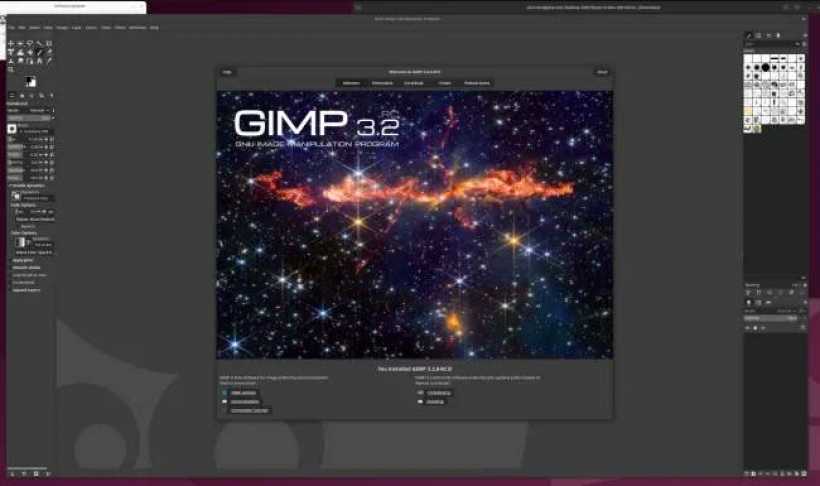
New Features That Make GIMP More Flexible
One of the biggest additions in GIMP 3.2 is support for new non-destructive layer workflows. That is a significant improvement because non-destructive editing has become one of the most important expectations in modern image software. People want the freedom to experiment without permanently damaging the original image or locking themselves into an early decision.
This kind of flexibility makes editing far less stressful. Whether someone is adjusting effects, testing creative ideas, or refining a composition in stages, non-destructive tools help keep the process more open and forgiving.
GIMP 3.2 also improves the MyPaint Brush tool, which should be especially welcome for digital artists who rely on more natural brush behavior for sketching, painting, and illustration work. On top of that, the release adds a new Overwrite paint mode, bringing another option for users who want greater control over how painting and editing actions behave.
There is also SVG export support, which helps broaden GIMP's usefulness for workflows that stretch beyond standard raster image editing. That addition may not be the flashiest feature in the release, but it adds convenience for users who work across different creative tools and file formats.
A Lot of Small Improvements That Matter
Not every good software update needs to be built around flashy headline features. Sometimes the most valuable changes are the quieter ones that make a program feel more polished day to day. That appears to be part of the story with GIMP 3.2.
Alongside the bigger feature additions, the release includes various interface and user experience improvements, along with general polishing throughout the application. Those kinds of refinements are easy to overlook in a feature list, but they often have the biggest impact over time. A smoother interface, cleaner behavior, and fewer rough edges can make a familiar tool feel much more pleasant to use.
For long-time GIMP users, that matters. GIMP has always been respected for its power and accessibility as a free, open-source alternative to commercial image editors, but it has also sometimes been criticized for rough workflow edges and an interface that did not always feel as modern or intuitive as some rivals. Updates like this help address that perception bit by bit.
Why This Release Feels Encouraging
What makes GIMP 3.2 especially interesting is not just what it adds, but what it suggests about the pace of the project. The release comes relatively quickly after GIMP 3.0, and that gives users a reason to feel optimistic. After such a long road to version 3.0, there was always a question of whether the project would be able to build momentum from there or fall back into a slower cycle again.
This release suggests the developers are trying to keep that momentum going.
That is good news for the wider open-source creative software scene too. GIMP remains one of the most recognizable names in free graphics editing, and every solid update helps strengthen its position as a serious option for users who do not want to depend entirely on subscription-based commercial tools.
It is still not a direct one-to-one replacement for Adobe Photoshop in every professional workflow, but that has never really been the only measure of success. For many people, GIMP is valuable because it is free, capable, community-driven, and increasingly modernized. A release like 3.2 reinforces that value.
A Sensible Step Forward
GIMP 3.2 may not be the kind of release that completely changes how people see the software overnight, but it does not need to. This is the kind of update that strengthens trust in the direction of the project. It adds useful new features, improves important tools, enhances workflow flexibility, and continues smoothing out the overall experience.
In other words, it feels like exactly the kind of release GIMP needed after 3.0.
Final Thoughts
GIMP 3.2 looks like a healthy, well-timed update for one of the most important open-source graphics applications around. With non-destructive layer improvements, a better MyPaint Brush tool, SVG export, a new Overwrite paint mode, and plenty of interface and usability refinements, it builds nicely on the groundwork laid by GIMP 3.0.
Perhaps just as importantly, it shows that the project is moving with more momentum now. After years of waiting for the big 3.0 transition, users are finally seeing what that new foundation can deliver. And if GIMP keeps this pace up, the future of the software starts to look a lot more exciting.











Comments 0