

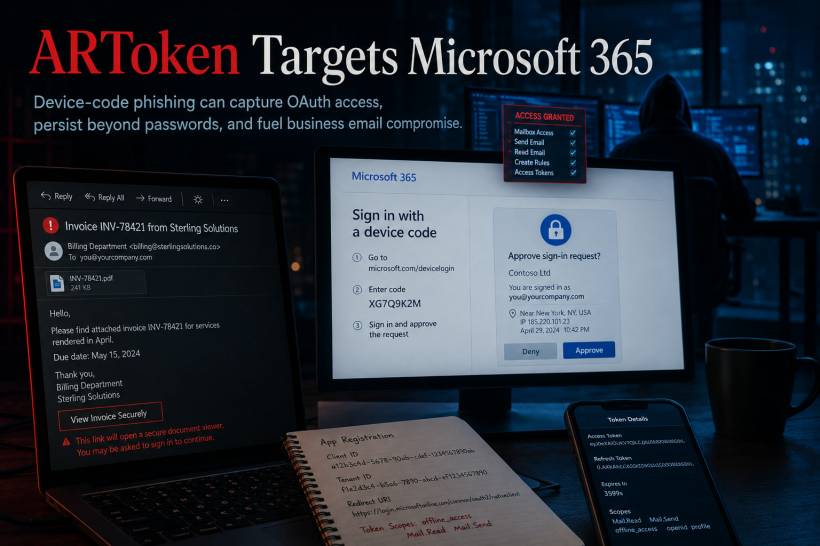
A sophisticated phishing platform targeting Microsoft 365 users is raising concern because it does not rely solely on stolen passwords. Known as ARToken, the service is designed to trick victims into approving a legitimate Microsoft device sign-in request controlled by an attacker. Once that approval is given, the attacker may receive valid access and refresh tokens, allowing continued access to the victim's Microsoft 365 account, email and potentially SharePoint data
This approach is particularly dangerous because it can make a phishing attack appear more legitimate. Instead of directing someone to a fake Microsoft login page, the victim may be taken through a real authentication process and unknowingly approve access for an unauthorised device.
How Device Code Phishing Changes the Risk
Device Code Authentication is a legitimate Microsoft sign-in method often used when a device cannot easily display a full browser-based login page. Normally, the user enters a short code through Microsoft's sign-in page to connect an authorised device to their account.
In a phishing scenario, the attacker initiates that process first and then convinces the victim to complete the authorisation. The victim may believe they are opening a document, reviewing an invoice or confirming access to a shared file, but the approval is actually granting an attacker-controlled device access to their account.
This does not necessarily mean multi-factor authentication has been technically broken. Instead, the attacker manipulates the user into completing a valid sign-in and approval process themselves.
That distinction matters because password changes alone may not always remove the attacker's access if valid refresh tokens or active sessions remain in place.
Why ARToken Is a Serious Threat to Microsoft 365 Users
The platform is described as a phishing-as-a-service operation, meaning it can provide multiple criminal affiliates with tools to launch campaigns using shared infrastructure.
Its capabilities reportedly include email harvesting, SharePoint data access, long-term token persistence and support for business email compromise activity. That can put organisations at risk of invoice fraud, financial scams, impersonation attempts and confidential data exposure.
Phishing emails are commonly designed to look like routine business correspondence. A message may imitate a supplier invoice, document-sharing notification or request from a trusted contact. Because these themes are familiar in workplaces, users may be more likely to act quickly without checking whether the request is genuine.
The Bigger Risk: Persistent Account Access
The most concerning part of token-based phishing is persistence.
With a traditional password phishing incident, changing the password may be enough to cut off an attacker in many situations. But when an attacker obtains valid OAuth tokens, they may retain access until the organisation specifically revokes sessions or invalidates refresh tokens.
This can give them time to quietly review mailboxes, search for financial conversations, access shared documents or impersonate the user in further phishing attempts.
For example, a compromised finance or procurement mailbox could be used to monitor ongoing payment discussions. The attacker may then send a convincing message at the right moment, requesting a change in bank details or redirecting a payment to a fraudulent account.
Microsoft 365 and Entra ID Environments Are the Main Target
The campaign is relevant to organisations using Microsoft 365, Microsoft Entra ID and applications that support OAuth Device Code Authentication.
The greatest risk is often not a technical weakness in the organisation's systems, but the possibility that a user is persuaded to approve an unexpected authentication request. Strong technical controls are still important, but awareness remains a critical part of the defence.
Users should be cautious when asked to enter a code, approve a device or complete a Microsoft sign-in step that they did not initiate themselves.
What Organisations Should Do
Organisations should review whether Device Code Authentication is genuinely required for their users and applications. Where it is not needed, restricting or disabling it can reduce the available attack surface.
Other recommended actions include:
• Use phishing-resistant authentication methods such as FIDO2 security keys or passkeys where possible.
• Strengthen Conditional Access policies to restrict unauthorised device authentication.
• Monitor Entra ID logs for unusual device-code activity, unexpected token issuance and suspicious sign-ins.
• Revoke active sessions, invalidate refresh tokens and reset credentials promptly when account compromise is suspected.
• Block known malicious domains, URLs and infrastructure indicators through DNS filtering, web proxies and perimeter security tools.
• Train users to recognise suspicious document-sharing, invoice and device-authorisation requests.
The document also includes a list of phishing-related domains and infrastructure indicators on page 3, which security teams can use for defensive blocking and threat-hunting activity.
Final Thoughts
Phishing is no longer limited to fake login pages and stolen passwords. Attackers are increasingly abusing legitimate sign-in flows to obtain access that appears valid to security systems.
For Microsoft 365 organisations, the key lesson is simple: an authentication prompt should never be approved simply because it looks genuine. Users should only complete device sign-in steps that they personally initiated, while IT teams should monitor token activity as closely as they monitor password-based attacks.











Comments 0