


Lemon Web Games continues to grow as more browser-playable titles are added to the collection, and with that growth comes one important challenge: keeping the browsing experience clean, fast, and easy to understand. When a game library is still small, showing a few recently added games, random picks, popular titles, and trending games is usually enough. But once the collection becomes larger, fixed sections can start to feel limited because visitors only see a small portion of what is available.
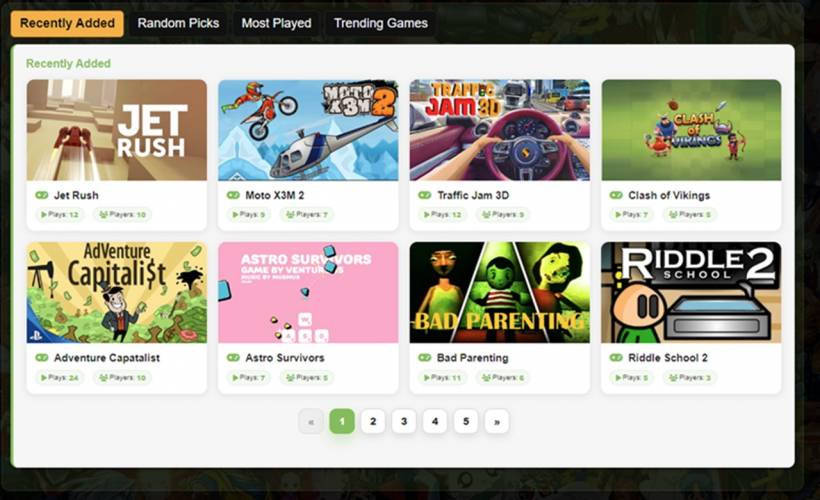
That is where the latest JavaScript update comes in. The new update adds proper pagination to the Recently Added, Random Picks, Most Played, and Trending Games sections, allowing each area to display more games without overcrowding the page. Instead of forcing too many cards into one long section, the layout now stays tidy while giving visitors a simple way to browse more titles directly from the homepage. The update builds on the existing Lemon Web Games JavaScript structure, including the current game grid IDs such as mp-grid, ra-grid, rg-grid, and tg-grid.
Why Pagination Matters For A Growing Game Library
As the Lemon Web Games collection expands, the homepage needs to balance discovery with readability. A visitor should be able to quickly see what is new, what is popular, what is trending, and what random games might be worth trying. However, showing too many games at once can make the page feel heavy, especially on mobile devices where screen space is limited.
Pagination solves this in a very practical way. Each section can now offer more games while still keeping the visible layout compact. On desktop, more cards can be shown per page because there is enough horizontal space. On mobile, fewer cards are displayed to keep the section comfortable to browse. This responsive behaviour keeps the page useful without making it feel too crowded.
The pagination is also capped at a maximum of five pages. This is an important design choice because unlimited pagination can make a section feel endless and unfocused. By limiting each section to five pages, the page still gives visitors more options, but it does not overwhelm them with too many controls or too many repeated browsing steps.
A Cleaner Experience Across Key Game Sections
The update applies to four important areas of the Lemon Web Games page: Recently Added, Random Picks, Most Played, and Trending Games. Each of these sections serves a different purpose, so adding pagination improves them in slightly different ways.
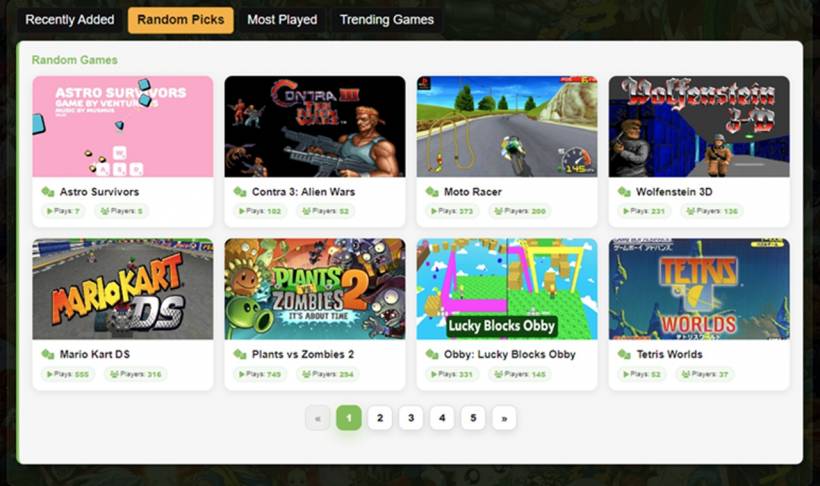
Recently Added benefits because visitors can now browse more new entries instead of only seeing the latest few titles. This is useful when several games are added close together, as older recent additions do not immediately disappear from view. Random Picks also becomes more useful because the section can show a broader rotating selection of games while still keeping the same clean card design.
Most Played becomes a stronger discovery section because visitors can browse through more popular titles beyond the first visible row. Trending Games also gets a better structure, especially because it is meant to highlight games that are gaining attention within a shorter time window. With pagination, each section has more room to be useful without making the homepage look messy.
Keeping Most Played And Trending Games Separate
One important rule from the original JavaScript was preserved and improved: if a game already appears in Most Played, it should not appear again in Trending Games. This matters because Most Played and Trending Games should feel like two different discovery areas. Most Played highlights long-term popularity, while Trending Games should help surface other titles that are currently getting attention.
When pagination was first added, this rule needed adjustment. The first approach only excluded games from the first visible page of Most Played. That meant a game shown on page two, three, four, or five of Most Played could still appear in Trending Games. Technically, the rule worked for the first page, but it did not cover the full paginated list.
The corrected logic now checks against the full paginated Most Played set, not just the first page. This gives Trending Games more value because it avoids repeating the same titles and gives other active games a better chance to be seen.
var maxItems = perPage() * MAX_PAGES;

var popularKeys = all
  .filter(function (item) {
    return item.plays > 0;
  })
  .sort(function (a, b) {
    return b.plays - a.plays;
  })
  .slice(0, maxItems)
  .map(function (item) {
    return normalizeName(item.name);
  });
This small change makes a big difference. Instead of checking only the first row of Most Played games, the script now checks all Most Played games included across the paginated pages. On desktop, that means up to 40 Most Played games can be excluded from Trending Games. On mobile, it can exclude up to 20, based on the smaller mobile display size.
Better Button Styling For Light Backgrounds
Another improvement came from the pagination buttons themselves. The first version of the pagination worked functionally, but the buttons were difficult to see because the colors blended too much with the section background. Since the game sections use a light container style, pagination buttons need strong contrast to remain visible.
The updated styling now uses white buttons with dark text, clear borders, and a stronger active state. The currently selected page uses the Lemon Web Games green tone, while hover states are more visible and easier to understand. Disabled previous and next buttons are still shown in a muted style, but they no longer disappear into the background.
This kind of refinement may seem small, but it affects the user experience directly. Pagination controls are only useful if visitors can immediately see and understand them. By improving the contrast and removing unnecessary page text, the controls now look cleaner and feel more natural within the page design.
Why The Page Counter Was Removed
The earlier version included a small text label such as "Page 1 of 5". While this is common in some interfaces, it did not really add much value here. The numbered buttons already show the user where they are, and the active green button makes the current page clear enough.
Removing the page counter makes the pagination area visually cleaner. Instead of adding another line of text below the game cards, the controls now focus only on what the visitor needs: previous, next, and the page numbers. For a game browsing page, this works better because the experience should feel quick and simple.
Sometimes interface improvements are not about adding more information, but removing what is not necessary. In this case, the cleaner pagination layout fits the visual style of Lemon Web Games better than a more formal page counter.
Testing Animation And Choosing Simplicity
A slide animation was also tested when moving between pagination pages. The idea was to make the cards slide left or right depending on whether the visitor clicked next or previous. Technically, this worked, and it did add a little motion to the page. However, after testing, the animation made the section feel less clean.
For a game library page with many image cards, animation can sometimes become distracting. Visitors may click through several pages quickly, and repeated motion can make the interface feel slower than it really is. Since the goal of this update is better browsing, the final decision was to remove the animation and keep page changes simple.
This was the right choice for the overall experience. The final result feels lighter, faster, and more practical. The game cards change immediately, the pagination remains clear, and the visitor can focus on the games rather than the transition effect.
A Small Update That Makes The Homepage Feel More Complete
This update may look simple from the outside, but it improves how the entire Lemon Web Games homepage works. Pagination gives each game section more breathing room, makes the library easier to browse, and helps visitors discover more titles without scrolling through an overly long page.
It also keeps the design consistent. The same card structure is reused across Recently Added, Random Picks, Most Played, and Trending Games, which helps the page feel unified. The pagination buttons now match the light section design better, and the removal of unnecessary text keeps the interface clean.
Most importantly, the improved Trending Games logic prevents repeated exposure of the same games across sections. That makes the homepage feel more balanced because each area can highlight a different part of the game library.
Final Thoughts
The new pagination update is a practical improvement for Lemon Web Games because it supports a growing collection without making the homepage feel cluttered. Visitors can now browse more games in each section, while the page still remains lightweight, responsive, and easy to use. The five-page limit keeps the experience controlled, the responsive card count works well across desktop and mobile, and the cleaner button styling makes the controls much easier to see.
In the end, this update is not just about adding page numbers. It is about improving game discovery in a way that feels natural for the site. Recently Added can show more fresh titles, Random Picks can surface more variety, Most Played can highlight a wider range of popular games, and Trending Games can avoid repeating what is already shown elsewhere. Combined together, these refinements make the Lemon Web Games homepage feel more polished, more organised, and better prepared for a larger library of playable browser games.











Comments 0