


Running a website like Lemon Web Solutions is not only about publishing content, adding web apps, or making classic games playable online. Once the site grows, the technical side becomes just as important as the content itself. A website that starts as a simple personal project can slowly become a much bigger platform with blog articles, HTML5 games, web tools, media files, tracking scripts, old links, redirects, subdomains, and many background requests that are not always obvious at first glance.
Recently, I had to spend time looking deeper into the performance side of Lemon Web Solutions, especially after the website started hitting shared hosting resource limits. The issue was not as simple as one broken page or one heavy script. It was more like a collection of small problems that slowly added pressure to the server. Some missing files were being requested repeatedly, some game folders had incomplete assets, some old URLs were still being crawled, and a few paths were producing unnecessary 404 errors. Individually, these issues may look small. Together, they can quietly affect performance.
When Website Growth Starts To Expose Hidden Problems
As Lemon Web Solutions continues to grow, the website naturally becomes more complex. There are blog articles, Lemon Web Apps, Lemon Web Games, emulator-based pages, media assets, JavaScript files, game wrappers, and multiple folders serving different types of content. This is good from a content and project perspective, but it also means the server has to deal with many more requests than before.
One important lesson from this process is that performance issues are not always caused by large visible pages. Sometimes, the real problem comes from missing assets that keep being requested in the background. A visitor may only see a game loading on screen, but behind the scenes, the browser might be trying to load missing sound files, missing WebGL bundles, missing manifests, missing service workers, or old paths that no longer exist.
That becomes more serious on shared hosting. Unlike a dedicated server or VPS, shared hosting has strict limits on CPU, memory, input/output usage, and concurrent processes. Once the website crosses those limits, the server may return Error 503 even if the main website itself is not technically broken. In simple terms, the website may still be working, but the hosting environment refuses to serve more requests because the account has reached its resource allocation.
Finding The Real Source Of The Load
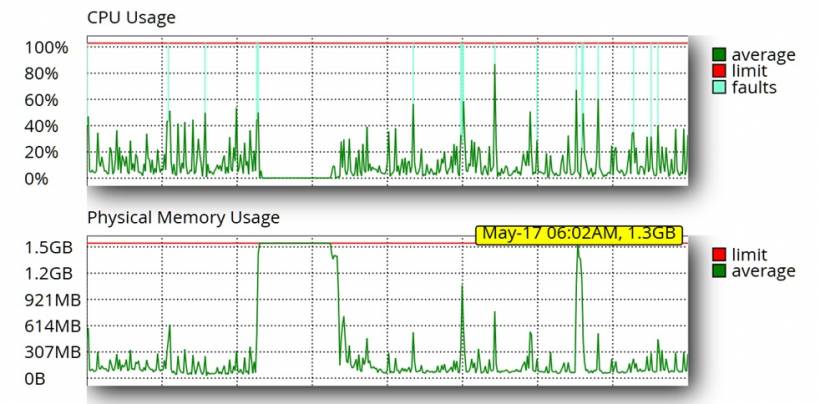
The first step was to look at the hosting resource graphs and compare them with the server logs. The CPU usage showed activity, but the more concerning part was the physical memory usage. The memory graph was climbing close to the account limit, which strongly suggested that the issue was related to too many active processes or repeated requests putting pressure on the hosting account.
The logs gave a clearer picture. A number of HTML5 games were requesting files that did not exist. Some were small files such as icons, screenshots, manifests, or service workers. Others were more serious, such as Unity WebGL bundle files. These are not normal missing files like a small favicon. In the case of WebGL games, missing bundles can mean that the game export is incomplete and the game keeps trying to load assets needed for levels, menus, skins, or other gameplay elements.
One of the biggest examples was an HTML5 game with missing Unity Addressables bundle files. The folder contained only some of the required .bundle files, while the game was trying to request many others. Since the original missing files could not be found, the next best option was to reduce the damage by using .htaccess rules to return lightweight responses for missing bundles instead of allowing repeated heavy 404 handling.
Fixing Missing Game Assets
The next area involved fixing missing game assets directly where possible. One game was repeatedly requesting missing sound files in MP3 format. After checking the files, the available versions were found in OGG format. Instead of leaving the game to repeatedly hit missing MP3 paths, the OGG files were converted in bulk to MP3 using FFmpeg and uploaded back into the correct game folder.
This type of fix is better than simply blocking the request because it restores the expected file and allows the game to behave more normally. If a game expects wood1.mp3, metal3.mp3, or achievement sound effects, and those files are available in another format, converting and placing them correctly can remove many errors at once.
Fixing missing assets is also better for user experience. A game may still appear playable without certain sounds or assets, but broken requests can affect loading behaviour, browser console errors, and server logs. Over time, these repeated missing requests can become unnecessary background noise that makes troubleshooting harder.
Using .htaccess To Reduce Wasteful Requests
After fixing what could be fixed, the next step was to use .htaccess carefully. The goal was not to block everything blindly, but to reduce wasteful requests that were clearly broken. Some common broken paths appeared across several HTML5 games, such as:
undefined/pages/home.html
null.html
sw.js
offlineClient.js
manifest.json
appmanifest.json
These are common leftover references from exported games, SDK integrations, service worker setups, or ad platform files. If the files do not exist, the server should not waste resources repeatedly processing them as normal missing pages.
To handle this, lightweight rules were added inside the /html5games/ directory. The rules return 410 Gone for clearly broken placeholder paths and for missing service worker or manifest files only when those files do not actually exist. This is important because some games may have real sw.js or manifest.json files. The rules should not break valid games.
Additional protection was also added for missing static media such as images, icons, audio files, and 3D assets. Again, the rule only applies when the requested file does not exist. Real existing images, audio, and game assets still load normally. This gives a safer balance between cleanup and compatibility.
Cleaning Up Lemon Web Apps Requests
Another area that needed attention was the Lemon Web Apps directory. The folder already had an index.html that redirects visitors to the main Lemon Web Apps page. However, the logs showed bots directly requesting index.php, which did not exist. Because of that, the server kept logging missing file requests.
Instead of creating a heavier PHP file, the cleaner approach was to add a simple .htaccess redirect for index.php. This means if a bot requests /html5apps/index.php, it is redirected cleanly to the Lemon Web Apps page rather than producing another missing file error.
The error handling inside that folder was also adjusted to use lightweight responses. This avoids unnecessary full error page processing inside a directory that mostly serves standalone apps and static files. For a site trying to reduce memory pressure, even small improvements like this matter.
Fixing Emulator Localization Requests
Another interesting issue came from the emulator localization folder. The folder already had many translation files, but their names used full locale formats such as en-US.json, ar-AR.json, and ru-RU.json. Some browsers or emulator scripts, however, requested shorter names such as en.json, ar.json, or ru.json, and regional variants like en-MY.json.
The fix was simple but useful. Duplicate alias files were created from the existing localization files. For example, en-US.json was copied to en.json, en-MY.json, and ms-MY.json. Similarly, ar-AR.json became ar.json, and ru-RU.json became ru.json.
This is better than blocking the requests because the emulator expects a valid JSON response. By providing fallback files, the browser receives proper content, the console becomes cleaner, and the server no longer records those localization files as missing.
Why These Small Fixes Matter
At first, these fixes may look too small to make a major difference. A missing icon here, a missing sound there, a missing manifest file somewhere else. But on a growing website, these small issues multiply quickly. One visitor can trigger dozens of missing requests. A bot can scan hundreds of old paths. A broken game export can repeatedly request unavailable assets during every play session.
The real problem is not only the missing files. The real problem is what happens after the files are missing. If the server handles every missing file through a heavier custom error page, redirects, PHP processing, or application routing, then a simple 404 can become more expensive than it should be. On shared hosting, that extra cost can eventually contribute to memory spikes and service instability.
By fixing actual missing files where possible and returning lightweight responses where files cannot be restored, the website becomes cleaner and more efficient. The logs become easier to read, the server handles fewer unnecessary requests, and future troubleshooting becomes much clearer.
Balancing Performance And Functionality
One important part of this process was avoiding destructive changes. It would have been easy to disable entire game folders or block broad file types, but that could break working games. Instead, the fixes were applied carefully. Existing files are still allowed. Only missing or clearly broken paths are handled differently.
This is especially important for Lemon Web Games because each game may have a different structure. Some games use service workers. Some do not. Some have manifests. Some do not. Some use Unity WebGL bundles, while others use simple HTML, JavaScript, and audio files. A broad blocking rule could easily fix one problem while creating another.
That is why the safer approach is to use conditions such as "only if the file does not exist." This allows valid assets to continue working while reducing the cost of broken requests.
What This Means For Lemon Web Solutions Moving Forward
This optimization exercise shows that website performance is not only about compressing images, enabling cache, or using a faster theme. Those things matter, but backend hygiene matters too. Broken paths, missing game assets, outdated references, unnecessary redirects, and heavy error handling can all affect a website's overall behaviour.
For Lemon Web Solutions, this cleanup is part of a bigger journey. The website has grown from a simple blog into a platform that includes web apps, technical articles, game publishing, emulator experiments, and many custom-built tools. As the site grows, performance maintenance becomes an ongoing task rather than a one-time fix.
The next step is to continue monitoring hosting resource usage after these changes. If physical memory usage becomes more stable, then the cleanup is already helping. If the problem continues, the next areas to review would be traffic patterns, bot activity, PHP processes, database usage, Cloudflare caching behaviour, and whether the site has outgrown the current shared hosting environment.
Final Thoughts
Optimizing Lemon Web Solutions was a good reminder that performance issues are often caused by many small things working together. A single missing file may not matter much, but hundreds or thousands of repeated missing requests can create unnecessary load. A single game with incomplete assets may still appear to work, but it can quietly produce repeated errors in the background. A folder with an index.html may seem fine, but bots requesting index.php can still create avoidable log noise.
The goal of this optimization was not to blindly block requests or remove features. The goal was to make the website cleaner, lighter, and more predictable. By fixing missing assets, adding smarter .htaccess rules, cleaning up broken paths, and reducing unnecessary error handling, Lemon Web Solutions is now better prepared to handle traffic more efficiently.
There is still more monitoring to do, but this cleanup is a strong step forward. For a growing website, performance is not only about speed. It is also about stability, resource control, and keeping the server from wasting effort on requests that should have been handled properly in the first place.











Comments 0