

If you've ever streamed a video on shaky Wi-Fi, used maps to dodge traffic, or tried to do "real work" on a phone screen the size of a biscuit, you've already met the main characters of mobile computing: movement, wireless networks, and multimedia.
The PDF you provided is essentially a full course module for CBMC4103 "Mobile Computing for Multimedia" from Open University Malaysia (OUM). It's designed as a 3-credit, 15-week course and expects around 120 study hours overall. The big goal is to help learners understand how mobile systems deliver multimedia experiences in the real world, and how to design and build applications that survive mobile constraints (bandwidth, battery, device limits, security, and more).
Instead of treating mobile apps as "tiny desktop apps," the module keeps pulling you back to a simple truth: mobile changes everything—how you design, how you communicate with servers, how you manage data, and how you keep users safe.
The Roadmap: 12 Topics That Build a Full Picture
The course is divided into 12 topics that move from foundations (what mobile computing is) into development frameworks, modelling tools (XML/UML), interface design (including voice and multimodal), network and data challenges, location-based services, security, and finally development/testing with a case study.
Think of it like a guided tour:
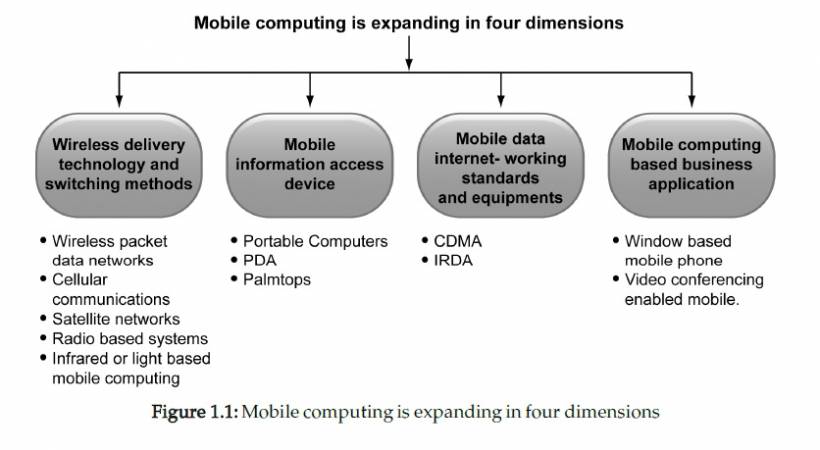
Topic 1: What Mobile Computing Is (And Why Multimedia Makes It Harder)
The module starts by defining mobile computing as enabling data transmission without being tied to a fixed physical connection—letting users access services from wherever they are.
Then it quickly gets practical: mobile computing is useful because it saves time, reduces friction, and lets people work (or access services) while moving. The examples in the module highlight real operational value, like field work, emergency response, court/legal referencing, business presentations, payment verification, and dispatch/tracking scenarios.
But once multimedia enters the picture—images, audio, video, real-time interaction—the stakes rise. Multimedia is heavier, more sensitive to latency, and less forgiving of unstable networks.
Topic 2: Frameworks, Tools, and Platforms (How People Actually Build Mobile Systems)
After the basics, the module shifts into development frameworks and tools. The idea is: mobile solutions don't exist in isolation. They sit inside architectures—sometimes tightly controlled, sometimes web-like and layered.
It introduces:
The key takeaway is not "memorise old platforms," but "understand the architectural trade-offs." If your system is server-heavy, the app can be simpler. If your users must work offline or semi-offline, the app has to carry more responsibility.
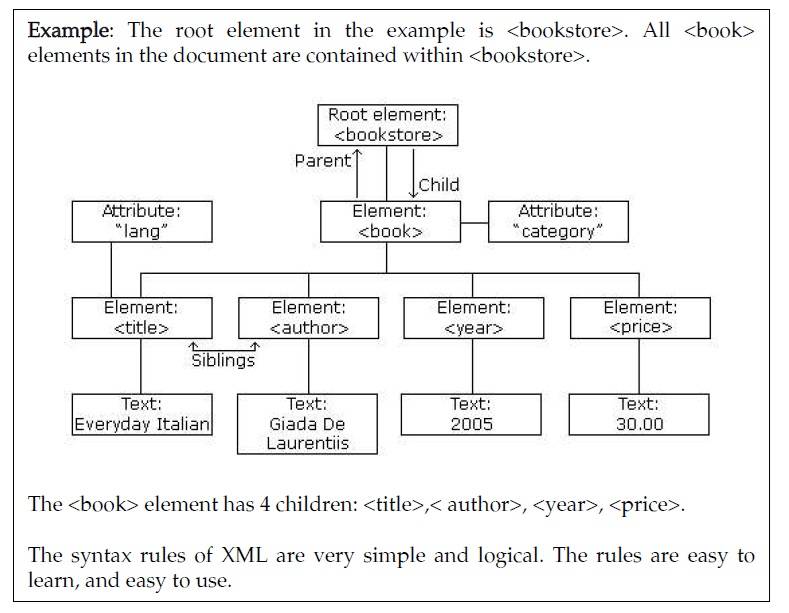
Topic 3: XML + UML (Making Mobile Systems Explainable and Buildable)
This is where the course gets very "engineering discipline" about it. Mobile apps are not just code—they're systems. And systems need modelling and structured data formats to stay maintainable. Topic 3 focuses on XML (as a document/metadata format) and UML (as a modelling tool), and how they support mobile computing.
In plain terms:
This matters even more in mobile because complexity sneaks in fast: devices, networks, services, synchronization, and security quickly create "too many moving parts."
Topic 4: Generic User Interface Development (Designing for Mobile Reality)
Mobile UI design isn't just "make it smaller." Topic 4 focuses on building generic user interfaces and modelling them with UML, plus concepts like XForms and the roles that older mobile technologies played (WAP, J2ME, BREW) in shaping mobile UI approaches. The underlying message: mobile UI must respect constraints and context:
So UI design becomes part usability and part survival strategy.
Topic 5: Voice and Multimodal Interfaces (When Touch Isn't Enough)
Topic 5 expands the UI story into voice user interfaces (VUI) and multimodal systems—apps that use multiple channels like voice, text, and visuals together. This topic treats voice as more than a gimmick. It dives into issues like:
The "multimodal" point is especially important for accessibility and practical use. Sometimes the best interface depends on where the user is and what they're doing (driving, walking, working hands-free, etc.).
Topic 6: Mobile Agents and Peer-to-Peer (Letting Systems Move and Collaborate)
Now the course gets more distributed-systems-minded. A mobile agent is presented as a software agent that can move between environments while keeping its state and data intact, and can choose when and where to migrate during execution. In other words: instead of bringing everything back to a server constantly, you can push work out into the network and let "agents" operate closer to where data or services live.
The topic also introduces mobile peer-to-peer computing, including a model called MOBI-DIK, framed around local search-and-discover applications that don't rely on fixed infrastructure.
The examples make it feel very real:
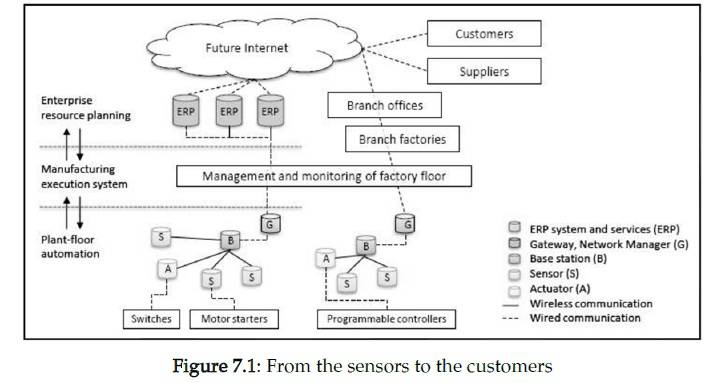
The bigger lesson: mobile computing isn't always "phone to server." Sometimes the most powerful systems are collaborative, local, and adaptive.
Topic 7: Wireless Connectivity and QoS (The Network Is Part of Your App)
This topic covers wireless connectivity, quality of service (QoS), surveys of wireless technologies, Mobile IP, and SMS. This is where the course practically says: if you ignore networks, your app will fail in the real world.
QoS is treated as a way to think about user satisfaction and service performance across networks—especially when bandwidth, latency, and reliability aren't consistent. Mobile IP is introduced to explain mobility at the networking level (staying reachable while moving). SMS is treated not just as messaging, but as a mobile service channel with architecture and applications.
Topic 8: Synchronisation and Replication (Keeping Mobile Data Sane)
Topic 8 tackles a classic mobile headache: data gets messy when you're offline, half-online, or switching networks. It covers replication and synchronization concepts and then highlights SyncML and WebDAV as mechanisms and standards associated with syncing mobile devices and managing documents across networks. In conversational terms: synchronization is what stops your phone, server, and other devices from living in three different realities.
The module notes SyncML as an XML-based protocol family used for device synchronization and WebDAV as HTTP-based methods for collaborative editing and file management on web servers.
Topic 9: Mobility and Location-Based Services (Where You Are Changes Everything)
This topic turns location into a "first-class feature." Location-based services (LBS) determine the user's position using positioning technologies, then combine location with other information to provide personalized services. The module frames LBS around three practical questions: "Where am I?", "What's around me?", and "How do I get there?"
From there, it connects LBS to real services like navigation, traffic advisories, maps/directions, roadside assistance, and even recommendations based on preferences and budget. It also signals what responsible developers must deal with: location is useful, but it's also sensitive. Which naturally leads to privacy and security discussions.
Topic 10: Active Transactions and Mobile Security (The "Do Not Ignore This" Section)
Topic 10 focuses on active computing and wireless infrastructure, plus mobile security—especially in wireless and ad hoc networking environments. The course covers themes like:
In a mobile context, security isn't only about encryption. It's also about what happens when networks change, devices are lost, apps are interrupted mid-transaction, or users connect through risky access points.
Topic 11: The Mobile Development Process (From "Idea" to "It Works in the Wild")
Topic 11 zooms out to process: how you actually plan and build mobile apps with the "dimensions of mobility" in mind, and how to select architecture/design/technology choices appropriately. This topic is basically the glue—connecting everything you learned earlier (networks, data, UI, modelling, security) into a repeatable development approach.
Topic 12: Mobile Applications in Practice (Voice, Location, Power, Testing, Case Study)
Finally, Topic 12 brings it back to application-level realities: voice interfaces, location-based service challenges, power usage, and testing—plus a case study to show how requirements drive architecture and implementation decisions. This is where the module's practical mindset becomes obvious:
The Big Takeaway: Mobile Multimedia Is a Balancing Act
When you step back, the PDF is teaching one consistent lesson: mobile computing for multimedia is about trade-offs.
You're constantly balancing:
And that's why the course leans on modelling tools (UML), structured formats (XML), solid architectures (client-server/N-tier), and careful thinking about connectivity, synchronization, location, and security.
Open University Malaysia (OUM). CBMC4103: Mobile Computing for Multimedia (Module). Open University Malaysia.











Comments 0