

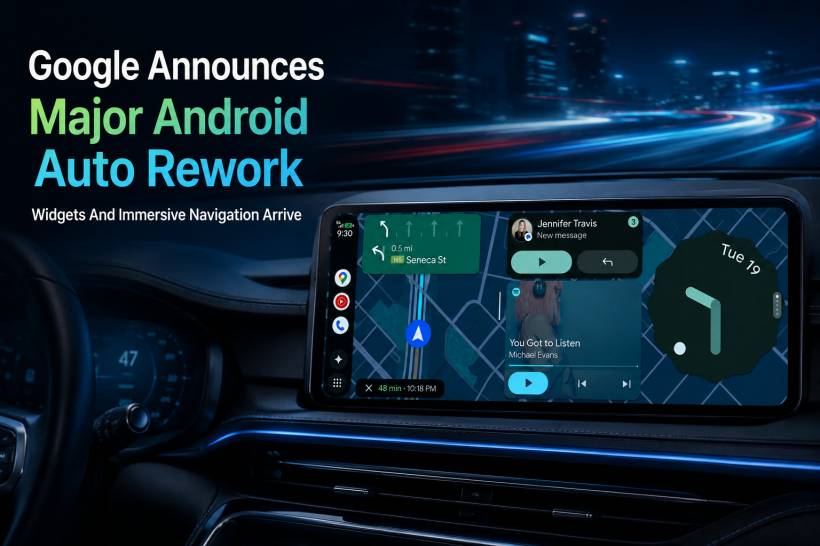
Google has announced a major refresh for Android Auto as part of the Android Show: I/O Edition 2026, and this looks like one of the more noticeable updates the platform has received in recent years. The update is not just about making Android Auto look nicer. It is also about bringing more of the Android phone experience into the car, while still keeping the interface practical for driving.
At the centre of this redesign is Google's Material 3 Expressive design language. This is the same design direction Google has been pushing across Android phones, with a stronger focus on personalisation, softer visuals, and a more modern interface. For Android Auto, that means the car display will start to feel a little closer to the Android phone experience, but adapted for a dashboard environment where visibility and simplicity still matter.
A More Personal Android Auto Interface
One of the smaller but still welcome changes is personalisation. Google is adding support for things like custom wallpapers and fonts, similar to what users already get on Android phones. On paper, these may not sound like major features, but they help make Android Auto feel less plain and more connected to the user's own device style.
This matters because Android Auto has traditionally been quite functional and straightforward. It does the job well, but it has not always felt very personal. With this update, Google seems to be moving Android Auto away from being just a mirrored car interface and closer to becoming an extension of the phone itself.
Of course, the challenge is balance. A car interface cannot be too busy or too distracting. Personalisation is useful, but Android Auto still needs to remain easy to read and quick to use while driving. That is likely why Google is introducing these visual changes together with a broader interface redesign rather than simply adding more decorative options.
Widgets Are Coming To Android Auto
One of the biggest new additions is widget support. This could become a very useful feature depending on how well it is implemented and how users choose to set it up.
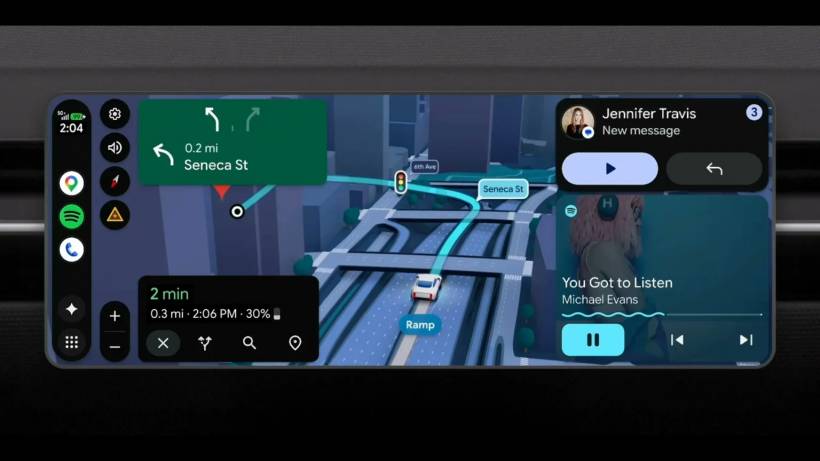
Widgets allow drivers to keep selected information visible without constantly switching apps. For example, a user could keep a music widget for Spotify or another media app while navigating with Google Maps. Someone expecting regular messages or calls could also place a contact-related widget for quicker access to communication features.
Naturally, widgets will take up some screen space. This means that when navigation is active, the map area may become smaller. For cars with large displays, this should be less of a problem. For vehicles with smaller screens, users may need to decide whether the extra information is worth sacrificing some map visibility.
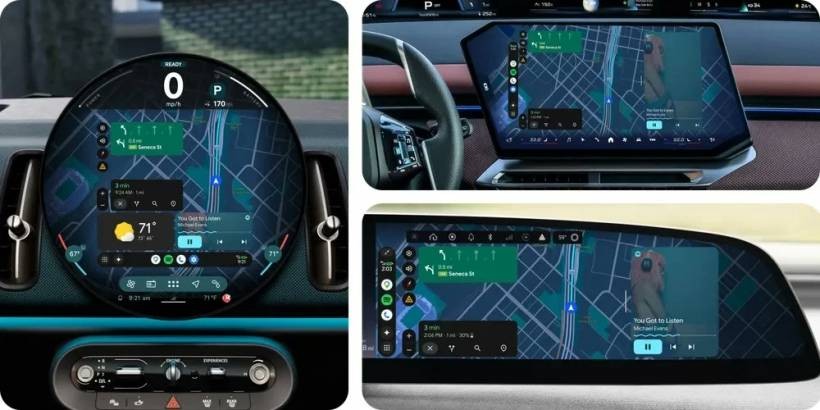
Google says widget support will also work with non-standard displays on supported cars. That is important because modern car screens come in many different shapes and sizes. Some are wide horizontal displays, some are portrait-oriented, and some are built into unusually shaped dashboards. A flexible widget system could make Android Auto feel more useful across different vehicles instead of being designed around one ideal screen size.
Immersive Navigation Could Be The Most Useful Upgrade
While widgets are the flashier interface feature, Immersive Navigation may be the update that makes the biggest real-world difference. This feature is technically part of a wider Google Maps update rather than being exclusive to Android Auto, but it should be especially helpful when used on a car display.
Instead of showing only the usual flat 2D map view, Immersive Navigation adds a simplified 3D view of the route. This includes buildings, terrain, and more importantly, structures such as overpasses. That may sound like a visual upgrade at first, but it could genuinely help drivers understand complex junctions and layered roads more clearly.
This is especially relevant in areas where roads overlap or split in confusing ways. In Malaysia, places like the roads around KL Eco City, Mid Valley, or other dense urban areas can be tricky because one wrong ramp or lane choice can lead to a completely different route. A clearer 3D view could make navigation feel less like guessing from a flat map and more like understanding the actual road environment ahead.
Google says the feature uses Gemini models to analyse fresh real-world imagery from sources such as Street View and aerial photos. The goal is to generate a more accurate visual understanding of landmarks, medians, terrain, and objects along the route. In theory, this should make the navigation experience more realistic without overloading the driver with too much detail.
Availability Will Start In The US First
As promising as Immersive Navigation sounds, it will not arrive everywhere immediately. Google says the rollout will begin in the United States first, with availability expanding over the coming months.
This is fairly typical for Google Maps and Android Auto features. New navigation functions often start in selected markets before reaching other countries. For Malaysian users, that means the feature may take some time before it becomes available locally, assuming it is eventually supported here.
When it does expand, Google says Immersive Navigation will be available across several platforms. This includes Android, iOS, Android Auto, Apple CarPlay, and vehicles with Google built-in. That is a broad rollout plan, and it suggests Google sees this as a core Maps improvement rather than a feature reserved only for Android users.
Video Playback Gets An Upgrade For Parked Cars
Google is also improving the entertainment side of Android Auto, but only for situations when the car is not being driven. The platform will support full HD video playback at 60 frames per second, giving users a smoother and sharper viewing experience when parked.
This could be useful during charging stops, waiting periods, or when parked safely before a trip. As expected, the system will not continue showing video once the vehicle starts moving. Instead, supported apps will transition to audio-only playback.
That makes sense for content such as podcasts, interviews, music videos, or long-form discussion videos where audio can still be useful after driving resumes. For visual-heavy content, the transition will be less useful, but the safety logic is understandable. Android Auto needs to support entertainment without encouraging drivers to watch video on the move.
A Bigger Push Toward Smarter In-Car Software
Taken as a whole, this Android Auto rework shows how Google is trying to make in-car software feel more modern and more connected to the wider Android ecosystem. Cars are no longer just using basic infotainment screens. Many drivers now expect the dashboard experience to feel as smooth and familiar as a smartphone.
The addition of widgets, improved personalisation, higher-quality video playback, and more advanced navigation all point in the same direction. Google wants Android Auto to become more useful, more flexible, and more visually refined. At the same time, it still needs to be careful not to make the interface too cluttered or distracting.
For users, the most practical benefit will likely depend on the car's screen size and layout. A larger display will make widgets and split-screen usage more comfortable, while smaller screens may feel tighter. Immersive Navigation, however, could be useful across many screen sizes because it improves how route information is presented.
Final Thoughts
Google's latest Android Auto redesign feels like a meaningful update rather than a simple visual refresh. Material 3 Expressive gives the platform a more modern identity, while widgets add a new layer of convenience for users who want quick access to music, contacts, or other useful information while navigating.
The most exciting feature, however, is Immersive Navigation. A clearer 3D-style route view could be genuinely helpful in complicated driving areas, especially in cities where flyovers, ramps, medians, and layered roads can make navigation confusing. For Malaysian drivers, this kind of feature could be very useful once it eventually becomes available here.
That said, rollout timing remains the biggest question. Many of the features are expected to arrive throughout the year, while Immersive Navigation will begin in the US before expanding elsewhere. For now, Android Auto users can look forward to a more polished, more personal, and more capable experience, but some of the most interesting improvements may still require patience depending on region and vehicle support.











Comments 0