

Windows Update has always been one of those Windows features that users know is important, but still complain about for very understandable reasons. Updates keep the system secure, fix bugs, improve hardware compatibility, and deliver new features. At the same time, they can also interrupt work, restart the computer at the wrong moment, or leave users wondering why the system suddenly needs attention again.
With the latest Windows 11 changes, Microsoft appears to be trying to make Windows Update feel less aggressive and more predictable. The company is not exactly giving users complete control over every update decision, but it does seem to be introducing better options for pausing updates, clearer update information, improved restart behaviour, and smarter recovery when something goes wrong.
For everyday users, this matters because Windows Update is no longer just a background maintenance tool. It affects productivity, gaming sessions, presentations, remote work, and even basic device reliability. So, if Microsoft can make the process smoother without weakening system security, that would be a welcome improvement.
Why Windows Update Needed A Rethink
For years, one of the biggest complaints about Windows Update has been timing. Most users understand that updates are necessary, but the frustration begins when Windows decides that the computer needs to restart while the user is in the middle of something important. Even worse, some users have experienced situations where multiple updates require multiple restarts within a short period of time.
This is where the new Windows 11 update changes become interesting. Microsoft seems to be addressing the experience around updates, not just the update mechanism itself. Instead of only focusing on delivering patches, the company is now paying more attention to how updates appear, how they are scheduled, how restarts are handled, and how much control users feel they have.
That does not mean Windows Update will suddenly become fully manual. Microsoft still wants most users to stay updated automatically, especially for security reasons. But the new approach may at least reduce some of the daily annoyance that has made Windows Update such a common complaint.
1. More Flexible Pause Controls For Updates
One of the biggest changes is the improved ability to pause automatic updates. Windows 11 still keeps the familiar 35-day pause limit, but users will be able to reschedule the pause again before it expires. In practice, this means users can keep extending the pause period if they really need to avoid automatic updates for a longer time.
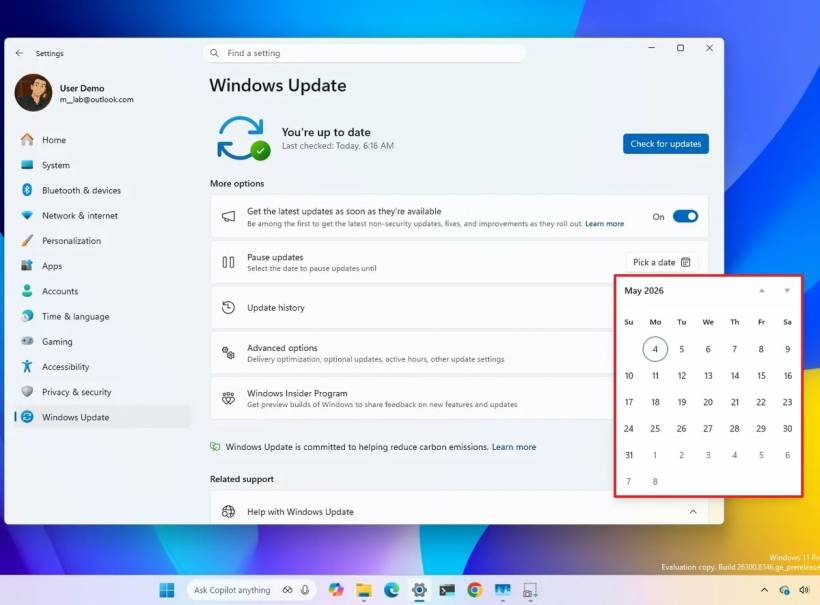
This could be useful for users who rely on their PC for critical work, live events, exams, production environments, or specialised software that cannot risk sudden update-related changes. Instead of feeling forced into an update window, they can delay installation and choose a better time.
However, this is not the same as permanently disabling Windows Update. Users still need to manually extend the pause before the current pause period ends. If they forget, Windows will resume automatic updates as usual. So, while this gives users more flexibility, it still keeps Microsoft's default update model intact.
2. A Redesigned Power Menu That Makes More Sense
Another practical improvement is the redesigned Power menu. This is one of those small changes that could make a big difference in daily use. Previously, users could sometimes feel trapped when Windows had an update waiting, because restart or shutdown options could become tied to update installation.
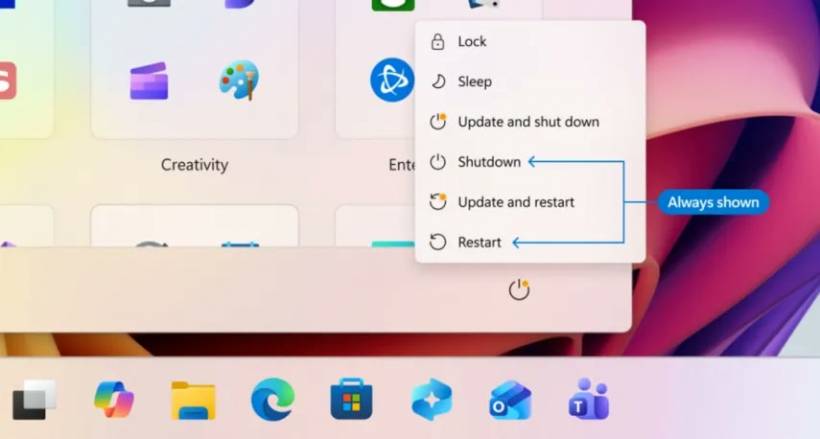
The updated Power menu separates normal power actions from update-related actions. Users should see options such as "Update and shut down" and "Update and restart" alongside the regular "Shut down" and "Restart" choices.
This is a much cleaner approach. If you simply want to shut down your laptop and leave the update for later, you should not feel forced into installing it immediately. For users who have been caught by surprise updates at the end of the day, this change alone may be one of the most appreciated improvements.
3. Clearer Update Information And Fewer Restart Disruptions
Microsoft is also improving how update information is shown inside Windows Update. Driver updates, for example, should become easier to understand because they will include clearer labels. Instead of vague or technical names that only advanced users can decode, driver updates should better indicate whether they relate to audio, display, battery, firmware, or other hardware components.
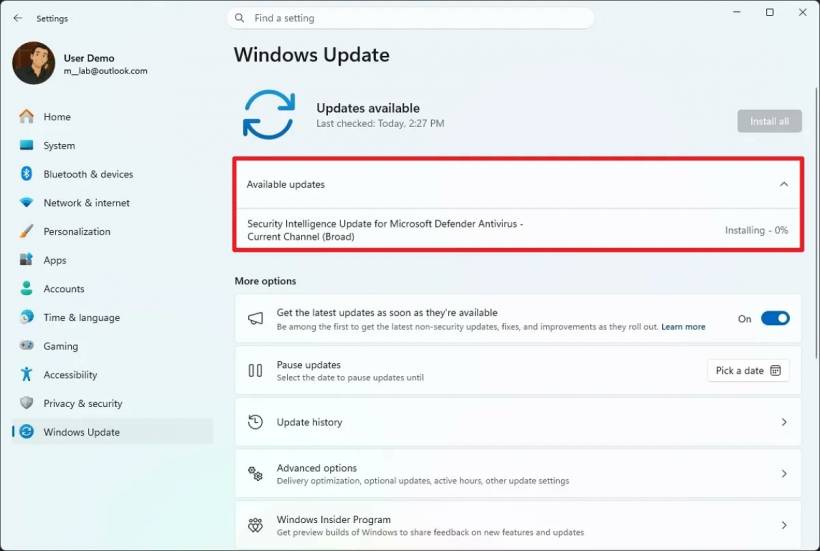
The Windows Update page is also getting a cleaner "Available updates" view. This collapsible section will show system updates, firmware, and drivers that are waiting to be installed. For users who like to know what is happening before clicking install, this is a useful transparency improvement.
More importantly, Microsoft is trying to reduce repeated restarts. The idea is to bundle firmware, driver, and product updates into the monthly update cycle, so users are less likely to face multiple restarts in a short time. Ideally, this means one main monthly reboot instead of several smaller interruptions scattered across different days.
For office users, students, gamers, and anyone who leaves their PC running for active tasks, fewer restarts can make Windows 11 feel much less disruptive.
4. Smarter Automatic Recovery When Updates Fail
Failed Windows updates can be extremely annoying. Sometimes an update refuses to install, throws an error code, or keeps retrying without explaining clearly what went wrong. Many users then have to search online, run troubleshooters, reset update components, or manually download the patch from the Microsoft Update Catalog.
Microsoft is now working on automatic recovery improvements that can fix certain update installation issues in the background. The goal is to reduce the need for manual troubleshooting and make failed updates less painful for normal users.
This is a sensible direction because most people do not want to become Windows Update technicians. They just want the update to install properly. If Windows can detect the issue, repair the update process, and continue without requiring the user to manually intervene, that would make the whole experience feel more reliable.
Of course, this will depend on how well the recovery system works in real-world situations. Windows Update problems can be caused by many things, including corrupted files, driver conflicts, storage issues, third-party security software, or unusual system configurations. Still, automatic recovery is a step in the right direction.
5. More Control During Windows 11 Setup
Microsoft is also changing the Windows 11 setup experience. During the Out-of-box Experience, or OOBE, users will have the option to skip system updates during the initial setup process.
This can be helpful when setting up a new PC quickly, especially if the user is in a hurry, has limited internet access, or does not want the setup process to take longer than necessary. Anyone who has set up a Windows device knows that update downloads during setup can sometimes turn a simple first boot into a long waiting session.
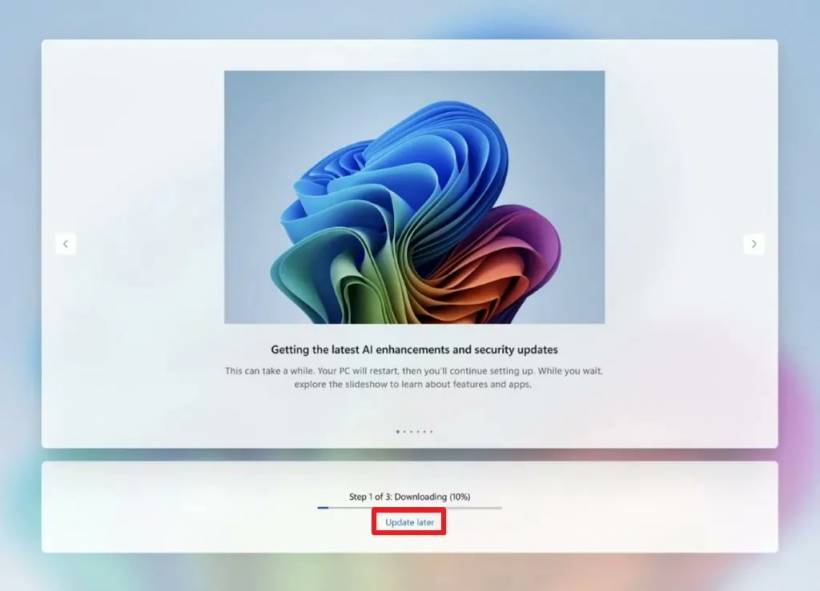
However, skipping updates also has a trade-off. The PC may not immediately receive the latest drivers, security patches, or feature updates. That means users who skip updates should still run Windows Update later when they have time. It is convenient, but it should not be treated as a permanent way to avoid updates.
Microsoft Is Improving The Experience, But Not Giving Up Control
These changes show that Microsoft understands some of the frustration around Windows Update. The redesigned Power menu, clearer update labels, fewer restarts, and automatic recovery features are all practical improvements. They do not feel like flashy headline features, but they are exactly the kind of quality-of-life changes that can improve the everyday Windows experience.
At the same time, Microsoft is clearly not stepping away from automatic updates. The company still wants Windows 11 devices to stay updated by default, especially because unpatched systems create security risks. That is understandable, but it also means users who want full manual control may still feel limited.
The new pause feature is a good example. It gives more flexibility, but it still requires users to keep extending the pause manually. If they forget, Windows goes back to automatic updating. That is better than before, but it is not the same as a full "update only when I say so" model.
What This Means For Everyday Windows 11 Users
For most people, these changes should make Windows Update less annoying. You may get clearer information before installing updates, fewer unexpected restarts, and better choices when shutting down or restarting your PC. If an update fails, Windows may also become better at fixing the problem quietly in the background.
For power users, IT admins, and people who manage multiple machines, the changes are useful but still limited. They improve the experience, but they do not fully replace proper update planning, testing, and deployment control. In managed environments, update policies and scheduling will still matter.
For home users, the best approach is probably to use the new controls wisely. Pause updates when you genuinely need stability for a specific period, check what updates are available, and choose restart timing carefully. But do not ignore updates completely, especially security updates.
Final Thoughts
Windows Update may never become everyone's favourite part of Windows 11, but these upcoming changes suggest Microsoft is at least trying to make it less disruptive. The improvements are not revolutionary, but they address several long-standing pain points that users have complained about for years.
The redesigned Power menu is probably the most immediately useful change because it gives users a clearer choice between normal shutdown and update-related shutdown. Fewer restarts should also make a noticeable difference, especially for people who use their PCs every day for work or study.
Still, this is more of a refinement than a complete shift in philosophy. Windows 11 updates will remain automatic by default, and Microsoft will continue pushing users toward staying current. The good news is that the experience may soon feel more transparent, more predictable, and slightly more respectful of the user's time.











Comments