

There was a time when Microsoft Edge felt like a serious attempt to build a better browser. It was clean, practical, and surprisingly thoughtful in places where Chrome had grown stagnant. Features like vertical tabs, Collections, and a more refined interface gave Edge a personality of its own. It was not the most popular browser, but it was easy to understand why many people stuck with it.
That is what makes the current version of Edge feel so different.
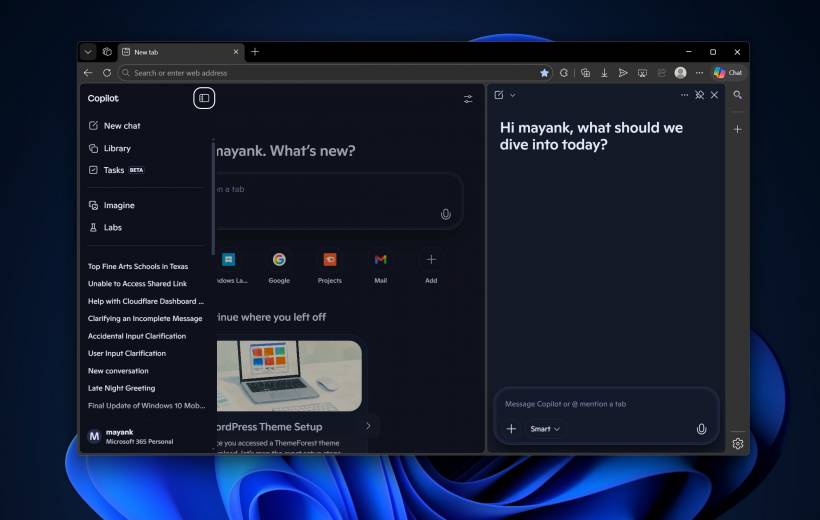
Today, Edge increasingly gives the impression that it is no longer centered on browsing first. Instead, it often feels like Microsoft is reshaping it into a delivery platform for Copilot. The browser is still there, of course, but the experience around it is becoming more and more AI-led, especially on the New Tab Page, where users might reasonably expect a search bar, website shortcuts, and a simple start screen. What they increasingly get instead is something closer to an AI workspace.
From Browser Companion to Center Stage
Microsoft has spent the last few years weaving Copilot into nearly every part of its software ecosystem, so its presence in Edge was always expected. In theory, this made sense. An AI assistant inside a browser could help summarize pages, draft text, answer questions, or speed up research. Used carefully, those features could complement normal browsing without overwhelming it.
The problem is that Edge no longer treats Copilot like a side feature.
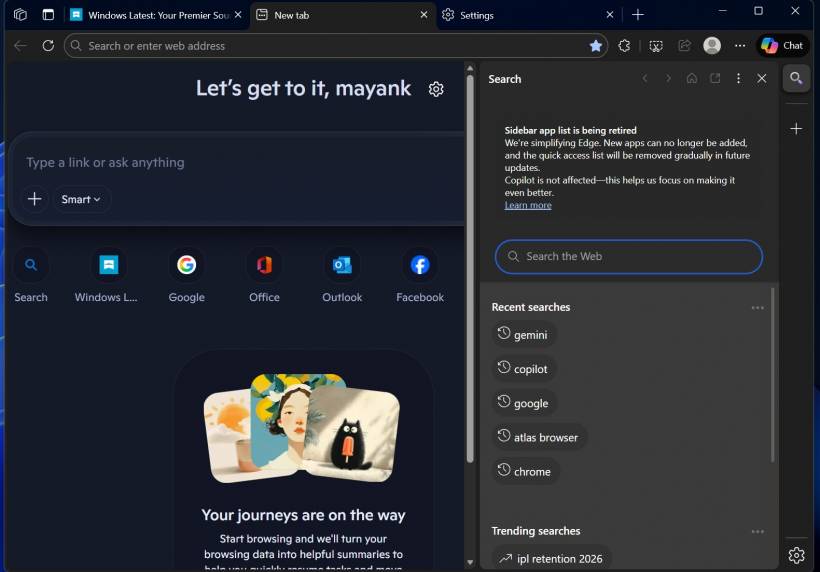
On the default New Tab Page, Copilot now takes a highly visible role, complete with a compose box and AI-driven prompts. In some versions of the experience, it resembles a chat app more than the opening screen of a web browser. There is also Copilot access in the sidebar, meaning the assistant is not just available, but repeatedly surfaced across the interface.
That design choice changes the tone of the product. Instead of AI being something you open when needed, it is something the browser seems eager to place in front of you from the start.
Why This Shift Feels So Jarring
The frustration is not simply about the inclusion of AI. Most modern browsers are experimenting with it in some form. Google has Gemini integrations in Chrome, and other browsers are testing their own assistant-style tools. The larger issue is how aggressively Edge presents its AI layer compared with the core act of browsing.
For many users, a browser is supposed to disappear into the background. It should help them get to websites quickly, stay organized, and avoid friction. Edge used to do that rather well. But when the homepage becomes dominated by a chatbot-style interface, the product starts sending a different message: browsing is no longer the main event.
This is especially disappointing because Edge once had a clearer identity. After Microsoft moved to Chromium, the browser gained major compatibility advantages while still managing to preserve some distinct ideas. That balance was important. It meant Edge could benefit from the same underlying web technology as Chrome without becoming a copy of Chrome.
Now, however, that identity seems to be fading. The browser is not only becoming more AI-heavy, but in other areas it is also looking and behaving more like Chrome, as several Edge-specific touches have been reduced or removed over time.
When AI Starts Getting in the Way
The biggest criticism is not philosophical. It is practical.
A browser can include all the AI tools it wants, but once those tools begin interfering with basic navigation, the experience quickly becomes frustrating. One example is the occasional issue where typing or pasting a URL right after opening Edge can send that input to the Copilot compose area rather than opening the intended site. It may not happen consistently, but even sporadic behavior like that creates confusion because it interrupts one of the most fundamental things a browser is supposed to do.
That kind of issue matters because it turns AI from an optional enhancement into an obstacle. Users do not mind extra features nearly as much as they mind features that hijack expected behavior.
Even when such moments are bugs or edge cases rather than intentional design, they reinforce the same impression: Copilot is becoming too central to the browsing experience.
Edge Is Still Good, but It Feels Less Focused
None of this means Edge has become a bad browser. In many respects, it is still fast, capable, and competitive. It remains a solid Chromium-based alternative with strong performance and useful tools. For many users, it may still be the best browser Microsoft has ever made.
But it no longer feels as focused as it once did.
Part of Edge's appeal was that it offered a slightly different vision of browsing. It felt like Chrome with more care given to workflow and interface design. That distinctiveness is harder to see now. As Microsoft leans further into AI and gradually strips away or de-emphasizes some of the features that once made Edge stand out, the browser risks losing the people who appreciated it not because it was flashy, but because it was quietly effective.
Can You Turn the AI Features Off?
To a point, yes.
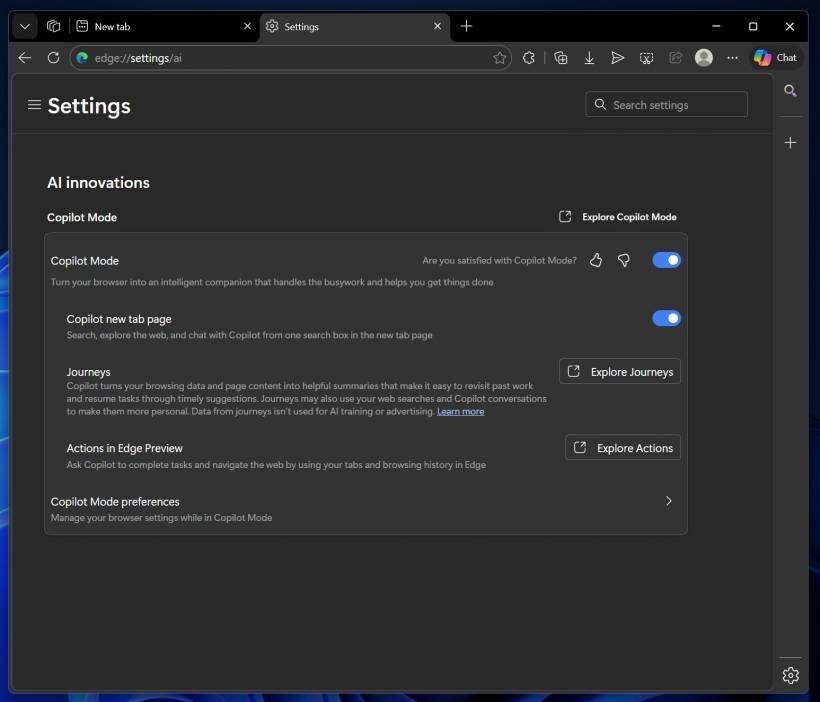
Copilot in Edge is still not entirely mandatory, but it is increasingly enabled by default and more deeply woven into the product than before. Users can reduce some of its visibility by going into Settings, opening AI innovations, and turning off Copilot mode. That can help make the browser feel less crowded and restore some of the simplicity people expect from a start page.
Still, the broader AI integration cannot be fully removed in any permanent or complete sense. Even if certain visible features are disabled, Copilot remains part of the browser's architecture and Microsoft's long-term direction for Edge.
So the question is no longer whether AI exists in the browser. It is whether users still feel in control of how much of it they want to see.
The Bigger Problem for Microsoft
What makes this shift worth paying attention to is that Edge never really won on market share alone. It won over some users by being unexpectedly good. It offered useful ideas, polished details, and a sense that Microsoft was trying to build something more intentional than just another Chromium skin.
That goodwill is not unlimited.
If Edge keeps pushing Copilot to the forefront while continuing to blur its own design identity, Microsoft may end up weakening one of the few things that made the browser genuinely appealing. AI can add value, but only when it supports the browsing experience rather than competing with it.
Right now, Edge still works well enough to recommend. But it increasingly feels like a browser trying to convince users to engage with Copilot first and the web second. And for people who simply want a browser to behave like a browser, that is a difficult trade-off to ignore.











Comments